
Splits without leakage
mapcv writes splits/train.txt, val.txt and test.txt at the end of generate when the config has a split block, and mapcv split rewrites them from the manifest in seconds. This page helps you choose the settings. For the reasoning behind them, see Spatial leakage.
Pick a strategy
Section titled “Pick a strategy”strategy |
Unit that is assigned | Leakage between splits | Use it when |
|---|---|---|---|
spatial (default) |
Square blocks of the raster | None from overlapping pixels; much less from neighbouring ones | You want test scores that predict performance on new areas. Almost always |
stratified |
Individual patches, balanced by labeled fraction and dominant class (detection and instance: most frequent object class; classification: the patch’s label) | Yes, if patches overlap or are adjacent | Reproducing an earlier patch-level split, e.g. from mapcv 0.1 |
random |
Individual patches, shuffled | Yes, if patches overlap or are adjacent | Quick experiments on non-overlapping, far-apart patches |
region |
Whole regions of an area of interest (region.path with name_field) |
None between regions that are apart; adjacent regions lose their overlapping train/val patches | Several sites, cities or tiles: test on places the model never saw |
test_ratio is a fraction of all patches; val_ratio is a fraction of what is left. With the defaults (0.20, 0.10), that is about 72 % train, 8 % val, 20 % test before any spatial adjustments.
How the spatial split works
Section titled “How the spatial split works”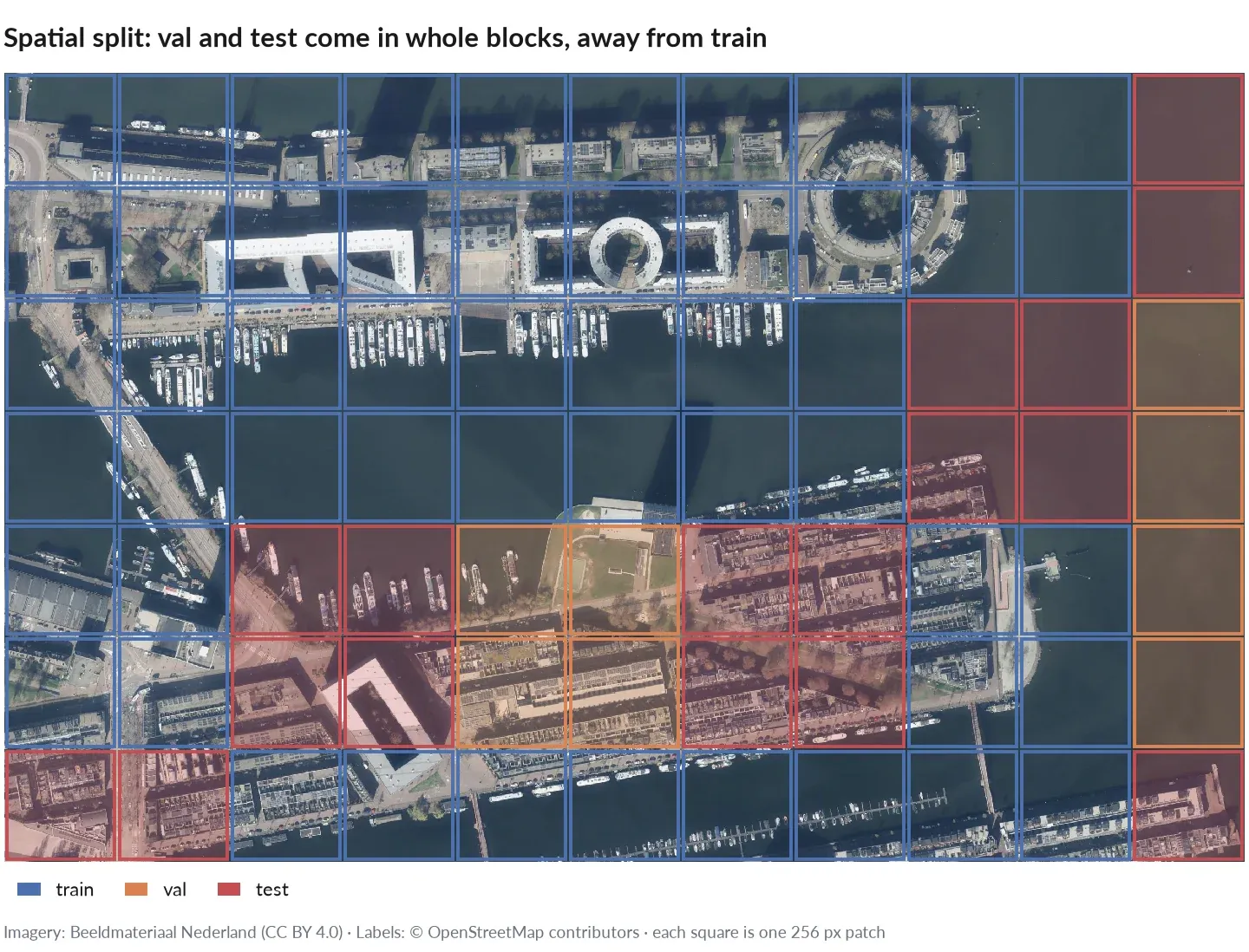
A spatial split of the quickstart’s dataset: green train, yellow val, pink test.
- The raster is divided into square blocks of
block_sizepixels. Each patch belongs to the block containing its top-left corner. - Blocks are shuffled with
seedand assigned whole, one by one: a block goes to test if that brings test closer to its target size, otherwise to val if that brings val closer to its target, otherwise to train. - Train and val patches whose footprint overlaps any test patch are left out, and so are train patches that overlap a val patch. They are listed in no split file.
$ mapcv split overlap✓ Splits written to overlap/splits: train 137 (67%) · val 10 (5%) · test 57 (28%) · 69overlapping patches left outThat example used stride: 128 with 256 px patches (heavy overlap) on a small raster. Without overlap (stride = patch_size, the default) nothing is left out.
Choosing block_size
Section titled “Choosing block_size”By default a block is 4 × patch_size pixels, reduced (never below one patch) so that the raster has at least 10 blocks. You can set it with split.block_size or mapcv split --block-size.
- Larger blocks separate splits more: neighbouring patches end up in the same split, and fewer patches sit on block borders. But whole blocks move together, so on a small raster the achieved ratios can drift from the targets (above: 28 % test instead of 20 %).
- Smaller blocks hit the ratios more precisely but put more test patches next to train patches.
- A useful lower bound is the distance over which your scene is similar: a few hundred metres for urban texture, kilometres for land cover. Convert with the pixel size from
mapcv plan.
Check the achieved shares in the summary or with mapcv info, and adjust block_size or seed if one split is too small.
Overlap warnings
Section titled “Overlap warnings”If you choose stratified or random on a dataset whose patches overlap (stride < patch_size) or repeat (mode: random), mapcv still writes the split and warns:
⚠ Patches overlap or repeat, so a 'random' split leaks pixels between train and test;use strategy 'spatial'.Even without overlap, adjacent patches share buildings, fields and lighting, so patch-level splits usually report optimistic scores. mapcv does not warn about that case.
Manifests from mapcv 0.1 do not record the patch size. A spatial split of such a dataset falls back to stratified with a warning unless you pass --block-size.
Empty splits
Section titled “Empty splits”A spatial or region split assigns whole blocks or regions, so a small area can leave val or test without a patch even though its ratio is above 0. mapcv then warns, for example No patch is left for val (split.val_ratio is 10%): whole regions go to one split; use more regions or a larger val_ratio. With three regions and the default ratios, none goes to val. Use more regions (or a smaller block_size for spatial), or set that ratio to 0 when you do not need the split.
Re-split without regenerating
Section titled “Re-split without regenerating”mapcv split dataset # defaults: spatial, 0.2 / 0.1mapcv split dataset --block-size 2048 --seed 7mapcv split dataset --strategy stratified --test-ratio 0.15The command reads only manifest.json, overwrites train/val/test.txt and split.json, and (re)writes the labeled subsets. It does not read the split block of your YAML; split.json records which settings produced the current lists.
Semi-supervised subsets
Section titled “Semi-supervised subsets”For each value in labeled_ratios (default [0.10, 0.20, 0.30]), mapcv shuffles train.txt and writes:
splits/<percent>/labeled.txt: the first ⌈ratio × len(train)⌉ patches,splits/<percent>/unlabeled.txt: the rest.
<percent> is the ratio as a percentage, written exactly (0.05 → 5/, 0.125 → 12.5/). Val and test are shared across all subsets, so results at different label budgets are comparable.
mapcv split dataset --labeled-ratios 0.01 --labeled-ratios 0.05 --labeled-ratios 0.1In YAML, set labeled_ratios: [] to skip them.
Sub-sampling
Section titled “Sub-sampling”sample_limit splits only a sample of the patches, for example to build a small benchmark from a large dataset. For spatial and stratified, the sample keeps the mix of empty, fully labeled and mixed patches; patches outside the sample appear in no list (mapcv split --sample-limit prints how many).